Self-Hosted DRM Streaming Panel

DRM Streaming Panel Widevine, PlayReady, HLS

Self-hosted DRM streaming panel that decrypts Widevine, PlayReady and FairPlay protected content. Converts DASH DRM and HLS DRM to clean HLS output in real-time. Internal remux engine, auto key acquisition, multi-provider scripts. One binary, one-line install.

One-Line Install — DRM Streaming Server
$ bash <(curl -s https://streamora.dev/updates/install.sh)
Ubuntu, Debian, CentOS, RHEL, Rocky, AlmaLinux, Fedora — run as root
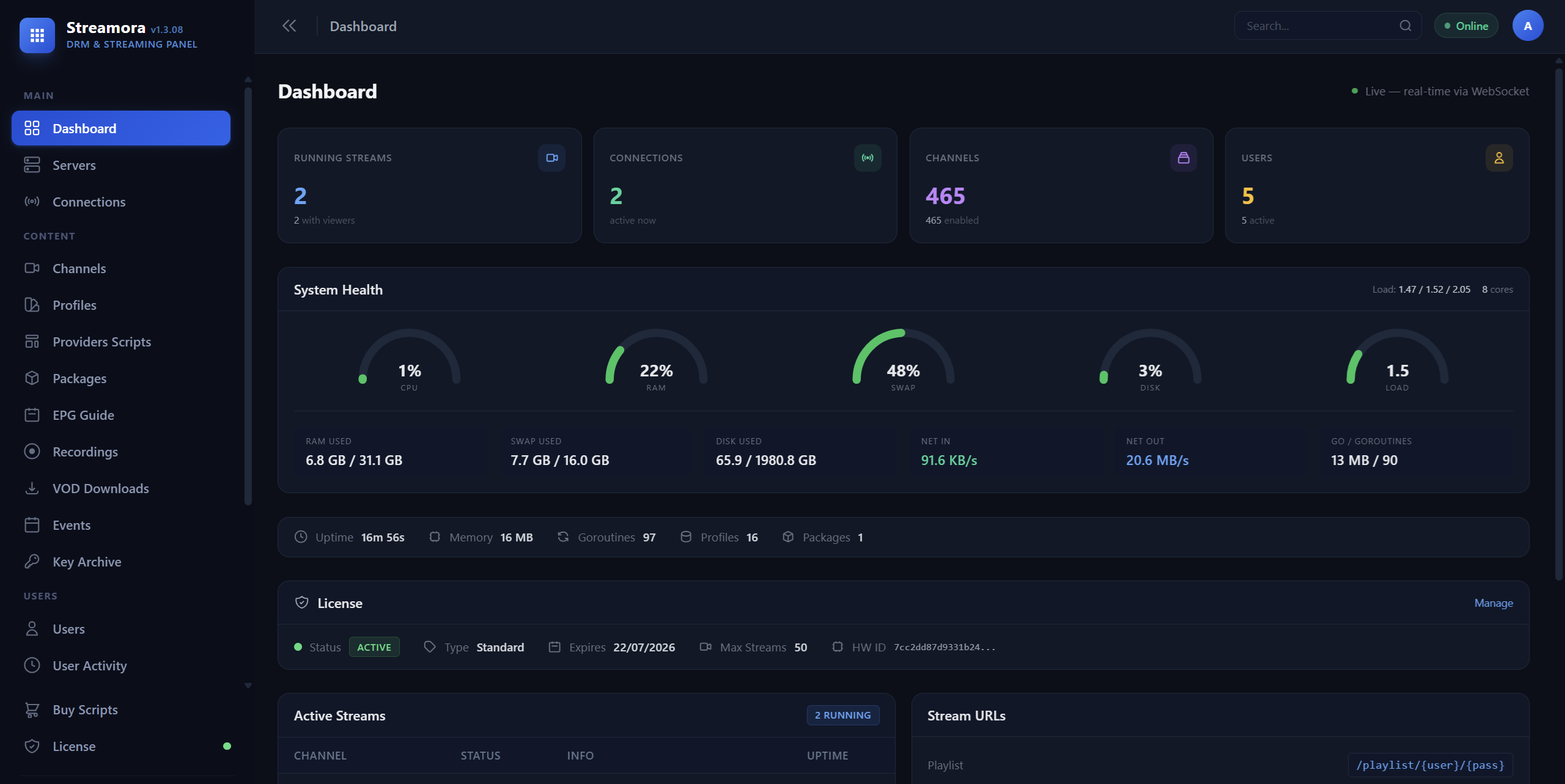
Streamora Dashboard
Streamora DRM Streaming Panel Dashboard — Real-time stream monitoring, system health, license management

DRM Streaming Panel Features

Everything you need to decrypt, convert, and serve DRM-protected streams from a single self-hosted server.

🔒

Widevine & PlayReady Decryption

Built-in Widevine L1/L3, PlayReady, FairPlay, and ClearKey DRM support. Auto key acquisition via CDM, manual key input, or provider script-based decryption. CENC and CBCS encryption modes.

🌐

Multi-Provider Script System

Python-based provider scripts with auto-sync, auto key refresh, and interactive terminal. Encrypted scripts (SENC) tied to license + hardware. One panel manages all DRM providers.

Internal Remux Engine

In-process fMP4 to MPEG-TS remuxer converts DASH DRM to HLS without FFmpeg. Parses ISO BMFF, decrypts AES-128-CTR CENC, converts H.264/H.265, wraps AAC/AC-3/E-AC-3.

💻

Professional Admin Dashboard

Real-time DRM stream monitoring, channel management, EPG, user management, recording, and download manager. WebSocket live updates, dark mode, fully responsive.

🔄

MPD to HLS Converter

Converts MPEG-DASH MPD manifests to HLS playlists in real-time. Handles SegmentTemplate, SegmentList, SegmentBase formats. Live edge detection with automatic segment deduplication.

🛡

Auto DRM Key Acquisition

Automatically acquires Widevine and PlayReady decryption keys from license servers using CDM devices. Keys cached in database, auto-refreshed on expiry. Zero manual intervention.

DRM Server Architecture

Built in Go for performance. Single binary, zero runtime dependencies.

DRM Processing Pipeline

  • Internal remux: fMP4 CENC decrypt + TS mux in-process (no FFmpeg)
  • FFmpeg remux mode for HLS DRM and complex transcoding
  • Named pipe architecture for real-time DRM decryption
  • Adaptive segment pacing with CDN token refresh
  • Multi-quality output with per-track selection
  • Live and on-demand DRM stream modes

Reliability & Scale

  • Stall detection watchdog with auto-recovery
  • Auto-restart on failure with exponential backoff
  • Multi-server load balancing with SSH auto-deploy
  • Binary integrity verification (HMAC-SHA256)
  • License validation with hardware binding
  • Stream recording, scheduled events, DVR

Supported DRM & Streaming Protocols

DASH + Widevine HLS + Widevine DASH + PlayReady HLS + FairPlay HLS + ClearKey CENC / CBCS Clear DASH / HLS Direct Streams

Input: MPEG-DASH (MPD), HLS (M3U8), Smooth Streaming, direct URLs. Output: HLS (MPEG-TS or fMP4), MPEG-TS, SRT. DRM: Widevine L1/L3, PlayReady, FairPlay, ClearKey, AES-128.

DRM Provider Scripts

Ready-made Python scripts for DRM content providers. Auto-sync channels, auto-configure profiles, auto-refresh tokens and decryption keys.

How Script Licensing Works
All paid scripts are a one-time purchase — no monthly fees, no subscriptions. Once installed, your script can run indefinitely.
  • Each purchase includes 1 month of free updates & support from the date of purchase.
  • If a provider patches or revokes access, we push a fix within the support period at no extra cost.
  • After the 1-month support window, install access expires — the script already on your server keeps working.
  • Need updates after your support period? Simply purchase again for another month of coverage.
  • There is no guarantee on how long a script will remain functional — providers can change their systems at any time — but many scripts run for months or years without issues.
Demo Provider (Open Source) Free
Developer reference template — fully documented open-source provider script showing how to build a Streamora provider. Contains real test streams (Axinom, Bitmovin, Shaka) with Clear, ClearKey, and Widevine DRM examples. ⚙️ SETUP GUIDE: 1. Credentials JSON — Any values work (demo mode): {"user": "test@example.com", "password": "test123"} 2. Extra Config JSON — Optional demo params: {"api_key": "demo-key"} 3. Proxy — Not required. 4. Click Sync to import demo channels. Use these to test your Streamora setup before adding real providers. This script is meant for developers who want to create their own provider scripts. Read the source code for documentation on the script protocol, profile defaults, and DRM handling.
Last Update: 31-03-2026 None — open source template for developers
Included Free
MEO Go
MEO Go (Portugal) — Full access to your MEO Go subscription channels. Live TV streaming with Widevine DRM via Nagra license server and automatic key acquisition. Features: • Automatic channel detection based on your MEO subscription • Widevine DRM decryption with Nagra token handling • Token caching — login once, session reused automatically • Session fallback — keeps working even if login temporarily fails • Interactive terminal mode for testing and debugging ⚙️ SETUP GUIDE: 1. Credentials JSON — Your MEO account login: {"user": "email_or_phone", "password": "yourpassword"} • user — Your MEO email address or phone number • password — Your MEO account password 2. Config JSON (optional) — Proxy for geo-restricted content: {"proxy": "http://user:pass@host:port"} • proxy — Portuguese residential proxy (required if outside Portugal) 3. Click Sync to import all channels from your MEO subscription. The script automatically detects which channels your subscription includes — basic plans get free-to-air channels, premium plans get the full lineup including sports and entertainment. Supported channel categories: Generalistas, Informação, Entretenimento, Desporto, and more depending on your MEO subscription tier.
Last Update: 03-04-2026 Active MEO Go subscription (Portugal). Portuguese proxy recommended if accessing from outside Portugal. 🌐 Portugal (Portuguese proxy recommended)
Purchase
DAZN Multi-Region (WAF)
DAZN Multi-Region — Live sports streaming with AWS WAF bypass. Supports France, Spain, UK, Germany, Italy, Canada, US, Belgium, Switzerland, Mexico. Linear channels + events (15 days ahead). Widevine DRM with automatic key acquisition. ⚙️ SETUP GUIDE: 1. Credentials JSON — Your DAZN account login: {"user": "email@example.com", "password": "yourpassword"} • user — Your DAZN email (use key "user", not "username") • password — Your DAZN password 2. Extra Config JSON — Country + Proxy (REQUIRED): {"country": "fr", "proxy": "http://user:pass@host:port"} • country — 2-letter code: fr, es, gb, de, it, ca, us, be, ch, mx • proxy — Residential proxy REQUIRED for DAZN login (datacenter IPs are blocked) 3. After setup, click Sync. The script imports: • Linear channels (24/7 streams) • Live & upcoming events (15 days) Note: DAZN uses aggressive bot detection (AWS WAF). The script handles WAF token refresh automatically. Device ID is auto-generated and cached.
Last Update: 31-03-2026 DAZN subscription. Residential proxy REQUIRED (datacenter IPs blocked). Config must include country code. 🌐 Multi-region (FR, ES, GB, DE, IT, CA, US, BE, CH, MX — residential proxy required)
Purchase
RAI Play Free
RAI Play (Italy) — All Italian public TV channels live. Free-to-air, no login required. Just set an Italian proxy and sync. Features: • 15+ live channels: Rai 1, Rai 2, Rai 3, Rai 4, Rai 5, Rai Movie, Rai Sport, Rai News 24, Rai 4K and more • No DRM — direct HLS streams • No account required — free public Italian TV • Now playing info shown in channel list ⚙️ SETUP GUIDE: 1. No Credentials needed — RAI Play is free public TV. 2. Config JSON — Italian proxy (required from outside Italy): {"proxy": "http://user:pass@italian-host:port"} 3. Click Sync to import all RAI channels. Streams are geo-restricted to Italy. A residential Italian proxy is required for access from outside Italy.
Last Update: 03-04-2026 Italian proxy required (geo-restricted to Italy). No account needed. 🌐 Italy (Italian proxy required)
Included Free
Italia DTT Free
Italia DTT — 139+ Italian digital terrestrial TV channels. Free-to-air, no login required. Includes all major Italian broadcasters. Features: • 139+ live channels: Rai, Mediaset, Discovery, Sky FTA, local stations and more • Channel logos included • No DRM — direct HLS streams • No account required — free public Italian DTT • Channel numbers (LCN) preserved from Italian DTT numbering ⚙️ SETUP GUIDE: 1. No Credentials needed — all channels are free-to-air. 2. Config JSON (optional) — Proxy for geo-restricted channels: {"proxy": "http://user:pass@italian-host:port"} 3. Click Sync to import all 139+ DTT channels. Some channels may require an Italian IP address. A residential Italian proxy is recommended for full access.
Last Update: 03-04-2026 Italian proxy may be needed for some channels. No account required. 🌐 Italy (some channels geo-restricted)
Included Free
Mediaset Infinity
Mediaset Infinity (Italy) — Live Italian TV channels from Mediaset. Includes Canale 5, Italia 1, Rete 4, and 25+ more channels. Features: • 27+ live channels: Canale 5, Italia 1, Rete 4, La 5, Cine34, Focus, Iris, Boing, Cartoonito, TGCom and more • No DRM — unprotected DASH streams • Free channels work without login • Optional Gigya login for premium Mediaset Infinity content • HD quality with automatic SD→HD upgrade ⚙️ SETUP GUIDE: 1. For free channels — no credentials needed, just sync. 2. For premium content — Credentials JSON: {"user": "email@example.com", "password": "yourpass"} 3. Config JSON (optional): {"proxy": "http://user:pass@host:port"} 4. Click Sync to import all available channels. Free channels (Canale 5, Italia 1, Rete 4, etc.) are available without an account. Premium Mediaset Infinity content requires a subscription and login.
Last Update: 03-04-2026 No account needed for free channels. Mediaset Infinity subscription for premium content. Italian/EU proxy may help. 🌐 Italy / EU
Purchase
LNP Basketball
LNP Basketball (Italy) — Live Italian professional basketball league events. Stream live games with team-based channels. Features: • Live basketball events from Italian LNP (Lega Nazionale Pallacanestro) • Automatic event discovery — live and upcoming games • Team names and schedule info in channel list • HLS streaming, no DRM • ViewLift platform integration ⚙️ SETUP GUIDE: 1. Credentials JSON — Your LNP account: {"user": "email@example.com", "password": "yourpass"} 2. Config JSON (optional): {"proxy": "http://user:pass@host:port"} 3. Click Sync to discover live and upcoming basketball events. Events appear as channels when games are scheduled. Each event shows team names and kickoff time. Channels are only available during live broadcast windows.
Last Update: 03-04-2026 LNP subscription. Italian proxy may be needed. 🌐 Italy
Purchase
Amazon Prime Sports
Amazon Prime Video Sports — Live sports events from Amazon Prime Video. Multi-region support (Italy, UK, Germany). Features: • Live sports events from Amazon Prime Video • Multi-region: Italy (Serie A, Champions League), UK (Premier League), Germany (Bundesliga) • PlayReady DRM with automatic key acquisition • DASH streaming, HD quality • Cookie-based authentication (browser cookies) ⚙️ SETUP GUIDE: Amazon uses browser cookies for auth (no email/password login): 1. Credentials JSON — Export cookies from your browser: {"session_token": "your-session-token-value", "at_main_av": "your-at-main-av-value", "session_id": "your-session-id-value"} OR place a Netscape-format cookies.txt in the script data directory. 2. Config JSON — Set your region: {"country": "it", "proxy": "http://user:pass@host:port"} Supported countries: it (Italy), uk (United Kingdom), de (Germany) 3. Click Sync to discover live sports events. How to get cookies: Log in to primevideo.com in your browser, then use a cookie export extension to get the session-token and at-main-av cookie values.
Last Update: 03-04-2026 Amazon Prime Video subscription with sports add-on. Browser cookies required for auth. 🌐 Italy, UK, Germany
Purchase
Shoq PK (StarzPlay Pakistan)
StarzPlay Pakistan (Shoq.com.pk) — 40+ live Pakistani TV channels including news, entertainment, sports & religious. Widevine DRM with auto key acquisition. ⚙️ SETUP GUIDE: 1. Credentials JSON — Your Shoq account login: {"user": "your@email.com", "password": "yourpassword"} 2. Extra Config JSON — Not required for this script. Leave as {} or omit. 3. Proxy — A Pakistan (PK) proxy is recommended for reliable access. Set it in the provider's proxy field. Some channels may work without proxy but the license server may block non-PK IPs. 4. After setup, click Sync to import channels. Session tokens are cached automatically — you won't need to re-login each time.
Last Update: 31-03-2026 Shoq.com.pk account (email + password). Pakistan proxy recommended. 🌐 Pakistan (PK proxy recommended)
Purchase
TataPlay
TataPlay India — 500+ live TV channels including Hindi, regional, sports, movies & news. Widevine + Irdeto DRM with auto key acquisition. ⚙️ SETUP GUIDE: 1. Credentials JSON — Your TataPlay subscriber details: {"user": "1234567890", "password": ""} • user — Your 10+ digit TataPlay Subscriber ID (found in your TataPlay app or account page) • password — Leave empty on first run. An OTP will be sent to your registered mobile number. 2. After receiving the OTP, update credentials with the OTP as password: {"user": "1234567890", "password": "123456"} Then click Sync again. Once verified, the session is cached for ~24 hours. 3. Extra Config JSON — Not required. Leave as {}. 4. Proxy — An Indian (IN) residential proxy is REQUIRED. Datacenter proxies are blocked. Set it in the provider's proxy field. 5. After setup, click Sync to import your entitled channels.
Last Update: 31-03-2026 TataPlay subscriber ID + OTP from registered mobile. Indian (IN) residential proxy required. 🌐 India (IN residential proxy required)
Purchase
JioTV
JioTV India — 800+ live TV channels covering all major Indian broadcasters — sports, news, entertainment, regional languages. Widevine DRM with auto key acquisition. ⚙️ SETUP GUIDE: 1. Credentials JSON — Your Jio mobile number: {"user": "9876543210", "password": ""} • user — Your 10-digit Jio mobile number • password — Leave empty on first run. An OTP will be sent via SMS to this number. 2. After receiving the OTP, update credentials: {"user": "9876543210", "password": "123456"} Then click Sync again. Session is cached after successful verification. 3. Extra Config JSON — Not required. Leave as {}. 4. Proxy — An Indian (IN) proxy is REQUIRED (geo-locked). Set it in the provider's proxy field. 5. After setup, click Sync to import channels.
Last Update: 31-03-2026 Jio mobile number + OTP verification. Indian (IN) proxy required. 🌐 India (IN proxy required)
Purchase
JioTV+
JioTV+ India — Enhanced JioTV with DASH streams. Supports both Widevine and ClearKey DRM (some channels need no CDM). Higher quality streams than standard JioTV. ⚙️ SETUP GUIDE: 1. Credentials JSON — Same as JioTV (shares login session): {"user": "9876543210", "password": ""} • user — Your 10-digit Jio mobile number • password — Leave empty on first run. OTP sent via SMS. 2. After OTP, update credentials and re-sync: {"user": "9876543210", "password": "123456"} Session is shared with JioTV — if you already set up JioTV, the cached session works here too. 3. Extra Config JSON — Not required. Leave as {}. 4. Proxy — An Indian (IN) proxy is REQUIRED (geo-locked). Set it in the provider's proxy field. 5. After setup, click Sync. ClearKey channels will show keys automatically, Widevine channels use the built-in CDM.
Last Update: 31-03-2026 Jio mobile number + OTP verification (shared with JioTV). Indian (IN) proxy required. 🌐 India (IN proxy required)
Purchase
DAZN
DAZN Global — Supports all DAZN regions (auto-detected from your account). Linear channels + live/upcoming events + EPG schedule. Widevine DRM with auto key acquisition. ⚙️ SETUP GUIDE: 1. Credentials JSON — Your DAZN login: {"user": "your@email.com", "password": "yourpassword"} 2. Extra Config JSON (optional): {"pin": "1234"} • pin — Age verification PIN (only if your DAZN account has parental controls enabled). Leave out if not needed. The script auto-detects your DAZN region from your account. No need to specify country. 3. Proxy — A residential or mobile proxy is REQUIRED. DAZN blocks datacenter IPs via CloudFront. If you get error 132986 ("Security policy"), your proxy is detected as datacenter. Set the proxy in the provider's proxy field. 4. After setup, click Sync. The script imports linear channels, live events, and upcoming events.
Last Update: 31-03-2026 DAZN account (email + password). Residential/mobile proxy required (datacenter IPs blocked). 🌐 Multi-region (proxy matching subscription country, residential only)
Purchase
Viaplay (Events & VOD)
Viaplay Netherlands — Sport events, movies & VOD content. Widevine DRM with auto key acquisition via thePlatform. ⚙️ SETUP GUIDE: 1. Credentials JSON — Your Viaplay NL login: {"user": "your@email.com", "password": "yourpassword"} 2. Extra Config JSON — Not required. Leave as {}. 3. Proxy — A Netherlands (NL) proxy is recommended for reliable access. Set it in the provider's proxy field. 4. After setup, click Sync. The script fetches all sport events (live + scheduled). Session cookies are cached automatically. Note: This version includes ALL events (live + upcoming + VOD). For live-only channels, use the "Viaplay Live" script instead.
Last Update: 31-03-2026 Viaplay NL account (email + password). Netherlands proxy recommended. 🌐 Netherlands (NL proxy recommended)
Purchase
Viaplay Live
Viaplay Netherlands — Live-only mode. Returns only currently broadcasting sport events, ideal for live TV lineups. Widevine DRM with auto key acquisition. ⚙️ SETUP GUIDE: 1. Credentials JSON — Your Viaplay NL login: {"user": "your@email.com", "password": "yourpassword"} 2. Extra Config JSON — Not required. Leave as {}. 3. Proxy — A Netherlands (NL) proxy is recommended. Set it in the provider's proxy field. 4. After setup, click Sync. Only live events are returned — the script pre-verifies keys during sync so only playable channels appear. Note: This version returns ONLY live events. For all events + VOD, use the "Viaplay (Events & VOD)" script instead. Set a short sync interval (e.g. 15-30 min) to keep the live lineup updated.
Last Update: 31-03-2026 Viaplay NL account (email + password). Netherlands proxy recommended. 🌐 Netherlands (NL proxy recommended)
Purchase
MagentaTV
MagentaTV by Deutsche Telekom — German live TV with 100+ channels including ARD, ZDF, RTL, ProSieben, Sky Sport & more. Widevine DRM with auto key acquisition. ⚙️ SETUP GUIDE: 1. Credentials JSON — Your Telekom/MagentaTV login: {"user": "your@email.com", "password": "yourpassword"} 2. Extra Config JSON — Not required. Leave as {}. 3. Proxy — A German (DE) residential proxy is REQUIRED. MagentaTV blocks datacenter IPs. Set it in the provider's proxy field. 4. After setup, click Sync. The script uses a multi-step OAuth flow (Telekom identity → persona token) and caches the session automatically. Only your entitled HD channels are imported. Note: Persona tokens expire every ~5 minutes and are auto-refreshed. If sync fails with auth errors, try again — the cached session may have expired.
Last Update: 31-03-2026 Telekom / MagentaTV account (email + password). German (DE) residential proxy required. 🌐 Germany (DE residential proxy required)
Purchase
NowTV / Sky / WOW
NowTV / Sky / WOW — Multi-country live TV provider supporting Italy (IT), Germany/WOW (DE), and United Kingdom (GB). DASH + Widevine DRM with automatic key acquisition. SUPPORTED COUNTRIES: • IT — NowTV Italy (nowtv.it) • DE — WOW TV Germany (wowtv.de) • GB — NowTV UK (nowtv.com) FEATURES: • DASH streaming with Widevine DRM (auto key acquisition via pywidevine) • Auto-installs missing dependencies (curl_cffi, pywidevine) on first run • OAuth authentication with automatic token refresh and session caching • Supports syncing ALL channels or filtering by category • Profile defaults: internal_remux, HLS output, 5-min manifest refresh, shared headers • Interactive terminal mode for diagnostics • Proxy passthrough for geo-restricted CDN access SETUP: 1. Credentials JSON: {"user": "email@example.com", "password": "yourpass"} 2. Config JSON: All channels (recommended): {"country": "DE", "proxy": "http://user:pass@host:port"} Filtered by category: {"country": "DE", "category": "SPORT", "proxy": "http://user:pass@host:port"} • country (REQUIRED) — IT, DE, or GB • category (OPTIONAL) — SPORT, ENTERTAINMENT, CINEMA, KIDS. If omitted, syncs ALL channels grouped by their category. • proxy (RECOMMENDED) — Required if server is outside the target country. To sync all channels from all categories in one provider, simply omit the category field. Channels will auto-group by type (NowTV SPORT, NowTV ENTERTAINMENT, etc.).
Last Update: 31-03-2026 NowTV/Sky/WOW account (email + password). Config must include country (IT/GB/DE). Category is optional — omit to get all channels. Country-specific proxy recommended. 🌐 Italy (IT), Germany (DE), United Kingdom (GB) — country-specific proxy required
Purchase
Discovery+
Discovery+ Free Tier — Free live channels from Discovery network including Discovery Channel, TLC, DMAX, Food Network & more. Widevine DRM. No account needed. ⚙️ SETUP GUIDE: 1. Credentials JSON — Not needed. Leave as {}. This script uses anonymous access — no login required. 2. Extra Config JSON — Country code (REQUIRED): {"country": "IT"} • country — Which Discovery+ region to use. Must be uppercase: IT = Italy, GB = United Kingdom, DE = Germany (Channel lineup varies by country) 3. Proxy — A proxy from the target country is recommended for best results. Set it in the provider's proxy field. 4. After setup, click Sync to import free channels. To sync multiple countries, create a separate provider per country (e.g. "Discovery+ IT" + "Discovery+ DE").
Last Update: 31-03-2026 No account needed. Extra Config must include country (IT/GB/DE). Country-matching proxy recommended. 🌐 Multi-region (IT, GB, DE — country-specific proxy recommended)
Purchase
Yallo TV
Yallo TV (Switzerland) — 300+ free live TV channels from Swiss and European networks. Clear DASH streams with no DRM. Anonymous access, no account needed. ⚙️ SETUP GUIDE: 1. Credentials JSON — Not needed. Leave as {}. This script uses anonymous access — no login required. 2. Extra Config JSON — Proxy & Group Filter: {"proxy": "http://user:pass@host:port", "group": "Italia"} • proxy — A Swiss proxy is recommended for accessing the full channel list. Without proxy, some channels may be geo-restricted. • group — (Optional) Filter channels by country/language group. Only channels from the specified group will be synced. Case-insensitive. 📋 AVAILABLE GROUPS: Italia ~54 channels (Rai, Mediaset, La7, RSI, Sky TG24, etc.) Deutschland ~78 channels (ARD, ZDF, ProSieben, RTL, SAT.1, etc.) Schweiz ~63 channels (SRF, RTS, RSI, local Swiss TV, MySports) France ~34 channels (TF1, France 2-5, M6, Arte FR, etc.) UK ~35 channels (BBC, ITV, Channel 4/5, Sky News, etc.) Türkiye ~8 channels (CNN Türk, Show Turk, Haber Turk, etc.) Austria ~6 channels (ORF, Servus TV, etc.) Portugal ~4 channels (RTP, Record TV, etc.) Balkan ~6 channels (HRT, RTCG, etc.) International ~19 channels (Al Jazeera, Bloomberg, CNN, Euronews EN, etc.) Other ~13 channels (miscellaneous) Examples: Only Italian channels: {"proxy": "http://...", "group": "Italia"} Only German channels: {"proxy": "http://...", "group": "Deutschland"} Only Swiss channels: {"proxy": "http://...", "group": "Schweiz"} All channels (default): {"proxy": "http://..."} 3. After setup, click Sync to import channels. The available groups with exact counts are displayed in the sync log every time.
Last Update: 01-04-2026 Swiss proxy recommended for full channel access. No account or login needed. 🌐 Switzerland (Swiss proxy recommended)
Purchase
NBA League Pass
NBA League Pass — Live NBA TV channels (NBATVD, NBATVI, NBATVC), live game streams, and featured events. Widevine DRM with auto key acquisition. ⚙️ SETUP GUIDE: 1. Credentials JSON — Your NBA account login: {"user": "your@email.com", "password": "yourpassword"} • user — Your NBA League Pass email • password — Your password. Alternatively, you can paste your nbaidentity cookie value (URL-encoded JSON) as the password for cookie-based auth. 2. Extra Config JSON — Not required. Leave as {}. 3. Proxy — A US proxy is recommended for full access. Some content may be geo-restricted. Set it in the provider's proxy field. 4. After setup, click Sync. The script imports 3 types of content: • Static channels: NBATVD (Domestic), NBATVI (International), NBATVC (Classic) • Live games: Currently broadcasting games • Featured events: NBA 24/7, special programming Note: Session is cached in auth.json. Device ID is auto-generated on first login.
Last Update: 31-03-2026 NBA League Pass subscription (email + password). US proxy recommended. 🌐 USA (US proxy recommended)
Purchase
DAZN Germany
DAZN Germany (Deutschland) — Bundesliga, Champions League, NFL, NBA, UFC, Boxing and more. Linear channels (DAZN 1, DAZN 2) + live events. Widevine DRM with auto key acquisition. ⚙️ SETUP GUIDE: 1. Credentials JSON — Your DAZN DE login: {"user": "your@email.com", "password": "yourpassword"} 2. Extra Config JSON (optional): {"pin": "1234"} • pin — Age verification PIN (only if your DAZN account has parental controls enabled). Leave out if not needed. 3. Proxy — A German (DE) residential or mobile proxy is REQUIRED. DAZN blocks datacenter IPs via CloudFront. If you get error 132986 ("Security policy"), your proxy is detected as datacenter — switch to a residential proxy. Set it in the provider's proxy field. 4. After setup, click Sync. The script imports linear channels, live events, and upcoming events. Note: This is the Germany-specific version with German content and language. For other DAZN regions, use the "DAZN" (global) script instead.
Last Update: 31-03-2026 DAZN DE account (email + password). German residential/mobile proxy required (datacenter IPs blocked). 🌐 Germany (DE residential proxy required)
Purchase
DirecTV Go
DirecTV Go — Live TV for Latin America (Argentina, Chile, Colombia, etc.). DASH streaming with Widevine DRM and automatic key acquisition. ⚙️ SETUP GUIDE: 1. Credentials JSON — Values from your browser's Local Storage: {"refresh_token": "...", "business_unit": "AR-DGO", "device_id": "..."} • refresh_token (REQUIRED) — From browser DevTools → Application → Local Storage → directvgo.com → "renewEntitlements" → refresh_token • business_unit (REQUIRED) — From "user" → businessUnit (e.g. AR-DGO, CL-DGO, CO-DGO, UY-DGO) • device_id (optional) — From "deviceId". If omitted, one is auto-generated. How to extract: 1. Log in to directvgo.com in your browser 2. Open DevTools (F12) → Application → Local Storage → https://www.directvgo.com 3. Copy the values listed above 2. Extra Config JSON — Not required. Leave as {}. 3. Proxy — A proxy from the target country (Argentina, Chile, Colombia, etc.) is recommended for geo-restricted content. Set it in the provider's proxy field. 4. After setup, click Sync to import live channels. Session tokens are cached and auto-refreshed.
Last Update: 31-03-2026 refresh_token, business_unit, device_id (from browser DevTools → Local Storage → directvgo.com) 🌐 Latin America (AR, CL, CO — country-specific proxy may be needed)
Purchase
TOD TV (beIN Sports)
TOD.tv (beIN Media Group) — 36+ live channels from the MENA region including beIN Sports, beIN Movies, Series, Kids, Discovery, Al Jazeera, and CNN Arabic. DASH streaming with Widevine DRM (Irdeto) and automatic key acquisition via Azure AD B2C authentication. ⚙️ SETUP GUIDE: 1. Credentials JSON — Your TOD.tv account login: {"user": "+201234567890", "password": "yourpassword"} • user — Your TOD.tv phone number (with country code, e.g. +20 for Egypt, +971 for UAE, +966 for Saudi) or email address • password — Your TOD.tv account password 2. Extra Config JSON — Not required. Leave as {}. 3. Proxy — A MENA proxy is REQUIRED (geo-locked). Supported regions: Egypt, UAE, Saudi Arabia, Qatar, etc. Set it in the provider's proxy field. 4. After setup, click Sync to import channels. The script handles Azure AD B2C authentication automatically and caches the session for reuse.
Last Update: 04-04-2026 user (phone number with country code or email), password. Requires MENA proxy (Egypt, UAE, Saudi, Qatar). Requires Playwright + Chromium for browser-based login. 🌐 MENA region (Egypt, UAE, Saudi, Qatar — MENA proxy required)
Purchase

DRM Streaming Panel Pricing

Simple, transparent licensing for your DRM streaming server.

Standard
1 Month
1 month license with 1000 concurrent streams
€ 29
1 month
1,000 streams 1 month
Get Started
Standard
6 Months
6 month license with 3,000 concurrent streams
€ 170
6 months
3,000 streams 6 months
Get Started
Unlimited
Lifetime
Lifetime license with 20,000 concurrent streams
€ 1999
Lifetime
20,000 streams Lifetime
Get Started

Frequently Asked Questions

Common questions about DRM streaming panels and Streamora.

What is a DRM streaming panel?
A DRM streaming panel is server software that decrypts DRM-protected streams (Widevine, PlayReady, FairPlay) and converts them to standard HLS or MPEG-TS output for delivery to end users. Streamora handles this with an internal remux engine that processes fMP4 CENC-encrypted content in real-time without requiring FFmpeg.
How does Streamora convert DASH DRM to HLS?
Streamora fetches the DASH MPD manifest, downloads encrypted fMP4 segments, decrypts them using Widevine or PlayReady keys (auto-acquired or manually configured), then remuxes the decrypted content into MPEG-TS segments with an HLS playlist. This happens in real-time using either the internal Go remux engine or FFmpeg via named pipes.
Does Streamora support Widevine and PlayReady DRM?
Yes. Streamora supports Widevine L1/L3, PlayReady, FairPlay, and ClearKey DRM systems. It can automatically acquire decryption keys from license servers using CDM devices, or you can provide keys manually. The auto key dump feature extracts keys without manual intervention.
What is the internal remux engine?
The internal remux engine is Streamora's built-in Go-based pipeline that converts fragmented MP4 (fMP4) with CENC encryption directly to MPEG-TS HLS output without requiring FFmpeg. It parses ISO BMFF boxes, decrypts AES-128-CTR samples, converts H.264/H.265 to Annex-B format, wraps AAC/AC-3/E-AC-3 audio, and builds HLS playlists — all in-process with zero external dependencies.
What is the MPD to HLS converter?
Streamora's MPD to HLS converter processes MPEG-DASH manifests (MPD files) — including DRM-encrypted ones — and outputs clean HLS (M3U8 + TS segments). It handles SegmentTemplate, SegmentList, and SegmentBase MPD formats, with automatic segment deduplication for live streams and CDN token refresh for expiring URLs.
How do I install Streamora?
Streamora installs with a single command: bash <(curl -s https://streamora.dev/updates/install.sh). The installer supports Ubuntu, Debian, CentOS, RHEL, Rocky Linux, AlmaLinux, and Fedora. It automatically installs all dependencies (FFmpeg, mp4decrypt, Python), creates the systemd service, and starts the admin panel.
Can Streamora handle live DRM streams?
Yes. Streamora supports both live and on-demand DRM streams. For live streams, it continuously polls the MPD/M3U8 manifest for new segments, decrypts them in real-time, and serves them as a live HLS output. CDN token refresh keeps streams running through URL expiration. Stall detection with auto-recovery ensures maximum uptime.

Start Your DRM Streaming Server

Install in under 2 minutes. One command, fully automated setup. Widevine, PlayReady, and FairPlay ready.